
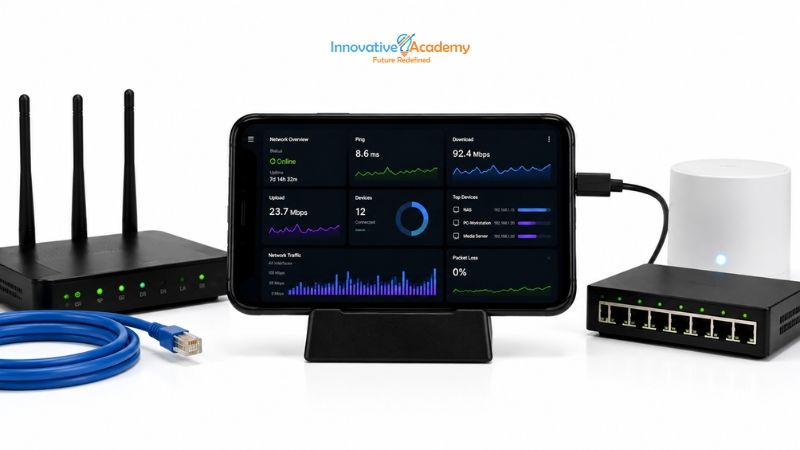

How I Turned a Retired Android Phone into an Always-On Network Monitor for My Home Lab
Table of Contents
- What Is a Network Monitor?
- Why Use an Old Android Phone?
- What You Need
- Preparing the Phone
- Connecting the Phone to Your Network
- Useful Network Monitoring Tools
- Monitoring Internet Connectivity
- Checking Latency and Packet Loss
- Discovering Devices on the Network
- Monitoring Your Router
- Creating a Simple Network Dashboard
- Keeping the Phone Always On
- What I Learned From the Project
- Limitations
- Ideas for Expanding the Project
- What Students Can Learn From This Project
- Final Thoughts
1. What Is a Network Monitor?
A network monitor is a system that observes the health and performance of a network.
Depending on the tools you use, it can help you answer questions such as:
- Is my internet connection working?
- How fast is my connection?
- Is latency increasing?
- Am I experiencing packet loss?
- Which devices are connected to my network?
- Is a particular server reachable?
- How frequently does my connection go down?
- Is my Wi-Fi signal strong enough?
In an enterprise environment, network administrators use sophisticated monitoring platforms to observe thousands of devices.
At home, however, you can build a much simpler monitoring system.
That's where an old Android phone becomes interesting.
If you are building your networking fundamentals, hands-on projects like this can complement structured CCNA training in Bangalore by allowing you to experiment with networking concepts outside the classroom.
2. Why Use an Old Android Phone?
An unused smartphone is essentially a small computer with networking capabilities.
It has many components that make it suitable for lightweight monitoring:
- Processor: Runs monitoring applications and scripts.
- Wi-Fi: Connects to your home network.
- Display: Shows monitoring information.
- Battery: Provides temporary power protection during short interruptions.
- Storage: Stores applications and monitoring data.
- USB port: Can provide additional connectivity depending on the device.
The phone doesn't need to be powerful. Even an older device with limited RAM can handle lightweight monitoring tasks.
The goal isn't to replace a professional network monitoring server. The goal is to create an inexpensive learning laboratory.
3. What You Need
For a basic setup, you need the following.
Hardware
- An old Android smartphone
- A reliable charging cable
- A USB power adapter
- Wi-Fi access
- Your home router
Software
You can use Android networking applications that provide functions such as:
- Ping
- DNS lookup
- Traceroute
- Port checking
- Network scanning
- Wi-Fi analysis
- Bandwidth testing
For students who want to go further, an Android terminal environment can provide a Linux-like command-line experience for experimentation.
The exact applications aren't as important as understanding what the tools are measuring.
If you're also learning Linux administration, you can connect this project with practical concepts covered in a Linux administration course in Bangalore.
4. Preparing the Phone
Before turning the phone into a monitoring device, perform some basic preparation.
Step 1: Factory Reset if Appropriate
If the phone contains old personal information and you no longer need it, consider performing a factory reset.
Always back up anything important first.
Step 2: Update the Operating System
Install available security and system updates.
An old device doesn't necessarily need the newest Android version, but it should be reasonably secure.
Step 3: Remove Unnecessary Applications
You don't need social media apps, games, or other applications running in the background.
The goal is to make the phone as lightweight as possible.
Step 4: Connect It to Wi-Fi
Connect the phone to your home network. Ideally, keep it in a location where the Wi-Fi signal is stable.
Step 5: Give It a Permanent Location
Instead of carrying the phone around, place it near your router or networking equipment.
This turns the smartphone into a small dedicated monitoring station.
5. Connecting the Phone to Your Network
Once connected to Wi-Fi, find the phone's local IP address.
It might look something like:
192.168.1.25Your network might use a different private IP range, such as:
- 192.168.0.x
- 10.0.0.x
- 172.16.x.x
The important concept is understanding the difference between private and public IP addresses.
Private IP Address
A private IP address is used inside your local network.
192.168.1.25Public IP Address
A public IP address is the address your internet service provider exposes to the internet.
Your phone can help you understand both sides of this networking setup.
Understanding IP addressing, subnetting, routing and network communication is also an important part of CCNA training.
6. Useful Network Monitoring Tools
Once the phone is ready, you can experiment with several networking utilities.
Ping
Ping is one of the simplest network diagnostic tools.
For example:
ping 192.168.1.1This can test whether your router is reachable.
You might see:
64 bytes from 192.168.1.1
time=2 ms
The response time represents latency.
What Does Latency Mean?
Latency is the time required for a packet to travel between two points. Lower latency generally means a faster response.
| Example Latency | General Interpretation |
|---|---|
| 2 ms | Excellent local response |
| 20 ms | Good |
| 100 ms | Noticeable delay |
| 300 ms | High latency |
These are illustrative values rather than strict performance thresholds.
7. Monitoring Internet Connectivity
Instead of only checking your router, you can periodically test an external host.
For example:
ping 1.1.1.1Or use another reliable server that you control or trust.
Now you can compare:
Phone → Router
with:
Phone → Internet destination
This distinction is useful.
Imagine your phone can successfully reach:
192.168.1.1but cannot reach an external destination.
That suggests the local Wi-Fi connection may be working while the problem exists somewhere between your router and the internet.
This is exactly the type of troubleshooting logic network administrators use.
8. Checking Latency and Packet Loss
A network can appear to be working while still experiencing performance problems.
For example, you might occasionally experience:
- Video buffering
- Online game lag
- Slow website loading
- VoIP interruptions
- Remote desktop delays
Monitoring latency over time can help identify these problems.
| Time | Destination | Latency | Result |
|---|---|---|---|
| 9:00 AM | Router | 3 ms | Good |
| 12:00 PM | Router | 5 ms | Good |
| 3:00 PM | Router | 8 ms | Good |
| 6:00 PM | Router | 35 ms | Increased |
| 9:00 PM | Router | 4 ms | Good |
You can then investigate why performance changed.
This introduces an important networking concept:
Monitoring is more useful when you collect data over time rather than checking the network only when something breaks.
9. Discovering Devices on the Network
One of the most interesting experiments is discovering devices connected to your own network.
A network scanner can identify devices that respond to network discovery techniques.
You might find devices such as:
192.168.1.1    Router
192.168.1.10   Laptop
192.168.1.15   Smart TV
192.168.1.20   Printer
192.168.1.25   Monitoring Phone
This can help students understand:
- IP addressing
- MAC addresses
- Hostnames
- Network discovery
- Ports
- Services
Important Security Rule
Only scan networks and devices that you own or have explicit permission to test.
Learning networking should always be done responsibly.
These concepts also provide a foundation for exploring cybersecurity and network administration in a controlled lab environment.
10. Monitoring Your Router
Your router is the heart of most home networks.
Depending on the router model, its administration interface may provide information such as:
- Connected devices
- IP addresses
- DHCP leases
- Wi-Fi clients
- Data usage
- Signal information
- Connection status
Your Android monitoring phone can act as another device from which you regularly check these services.
For a more advanced setup, you can explore monitoring protocols such as SNMP, if your router supports them.
This introduces a concept used heavily in professional IT environments:
Devices can expose information that monitoring systems collect and analyze.
11. Creating a Simple Network Dashboard
Once basic monitoring works, you can make the project more interesting.
Imagine the old phone displaying:
HOME LAB MONITOR

Internet:       ONLINE
Router:         ONLINE
Latency:        4 ms
Packet Loss:    0%
Wi-Fi Signal:   Good

Devices:
Online:         7
Offline:        1

DNS:            OK
Last Check:     12:35 PM
Now your old smartphone isn't simply running a networking application.
It has become a small network operations dashboard.
You could mount it next to your router and leave it running.
12. Keeping the Phone Always On
This is where an old smartphone becomes particularly useful.
Configure the device so that:
- It stays connected to Wi-Fi.
- The monitoring application can continue running.
- The screen doesn't turn off too quickly if you want a dashboard.
- Battery optimization doesn't stop your monitoring application.
- The phone remains connected to reliable power.
However, continuously charging an old battery for long periods can create safety and battery-health concerns.
If the phone becomes unusually hot, swollen, or damaged, stop using it and replace the battery or device.
For an always-on project, temperature and battery condition matter.
13. What I Learned From the Project
The biggest benefit of this project isn't the phone. It's the networking knowledge you gain while building it.
For example, you start understanding the difference between:
Connectivity
Can the device reach another device?
Latency
How long does communication take?
Packet Loss
Are packets failing to reach their destination?
DNS
Can domain names be translated into IP addresses?
DHCP
How are IP addresses automatically assigned?
Routing
How does traffic move between networks?
Ports
Which network services are listening?
These concepts can seem theoretical when you study them in a textbook.
They become much easier to understand when you can actually observe them.
If you're progressing from networking fundamentals toward cloud technologies, these skills can also support your learning journey through AWS training in Bangalore and cloud infrastructure.
14. Limitations
An Android phone isn't a replacement for professional monitoring infrastructure.
There are several limitations.
Limited Processing Power
Older phones aren't designed to monitor large networks.
Android Restrictions
Background applications may be restricted by Android's power-management system.
Wi-Fi Dependency
If the phone itself relies on Wi-Fi, it may not detect every type of Wi-Fi problem accurately.
Limited Storage
Long-term monitoring can generate significant amounts of data.
Battery Aging
Older batteries may not be suitable for continuous operation.
No Enterprise-Scale Monitoring
A smartphone isn't designed to monitor hundreds or thousands of network devices.
But for a home lab and learning environment, these limitations aren't necessarily a problem.
15. Ideas for Expanding the Project
Project 1: Internet Outage Logger
Create a system that records when internet connectivity disappears.
10:32:14 — Internet DOWN
10:33:02 — Internet RESTORED
Duration: 48 seconds
After several days, you could analyze the outage patterns.
Project 2: Wi-Fi Performance Monitor
Record Wi-Fi signal strength throughout the day.
Morning   → Strong
Afternoon → Strong
Evening   → Moderate
Night     → Strong
This can help you investigate Wi-Fi interference and coverage.
Project 3: Network Device Monitor
Create a list of devices that should normally be online.
Router       ONLINE
NAS          ONLINE
Server       ONLINE
Printer      OFFLINE
Raspberry Pi ONLINE
If a known device stops responding, the monitoring system can record the event.
Project 4: Raspberry Pi + Android
If you later add a Raspberry Pi or another small computer, you can move the monitoring workload to the Pi while using the Android phone as the display.
Network
   ↓
Raspberry Pi
   ↓
Monitoring Software
   ↓
Android Dashboard
You now have a great stepping stone toward learning professional monitoring architectures.
Project 5: Cloud Monitoring
Once you understand local monitoring, you can explore sending selected metrics to a cloud service.
Home Network
      ↓
Monitoring Device
      ↓
Metrics
      ↓
Cloud Platform
      ↓
Dashboard
This connects networking concepts with cloud computing, DevOps, databases, and observability.
Students interested in automation and infrastructure can take this further through DevOps training in Bangalore, where monitoring, automation, Linux and cloud technologies come together.
16. What Students Can Learn From This Project
This simple project can become a surprisingly good practical exercise.
Networking
- IP addresses
- Subnets
- DHCP
- DNS
- Routing
- Ports
- Latency
- Packet loss
Linux
- Command-line tools
- Shell commands
- Processes
- Logs
- Automation
Cloud
- Metrics
- Monitoring
- Dashboards
- Remote systems
DevOps
- Automation
- Observability
- Alerts
- Infrastructure monitoring
Cybersecurity
- Network discovery
- Open ports
- Device visibility
- Basic network hygiene
Most importantly, students learn how to troubleshoot instead of simply memorizing commands.
If you're looking to build these skills through structured, hands-on learning, you can explore networking courses in Bangalore and combine networking fundamentals with Linux, cloud and DevOps.
17. Final Thoughts
One of the best ways to learn IT isn't always by buying expensive hardware.
Sometimes the best learning project is sitting in a drawer.
An old Android phone can become a simple network monitoring station that helps you understand what is happening inside your home network.
Start with something as simple as:
Ping → Measure → Record → AnalyzeThen gradually add:
Device Discovery
      ↓
Network Monitoring
      ↓
Automation
      ↓
Dashboards
      ↓
Alerts
      ↓
Cloud Monitoring
What begins as an unused smartphone can eventually become a practical home-lab project covering networking, Linux, automation, monitoring, cloud, and DevOps.
And that's the real value of a home lab:
You don't just read about technology. You build something, break it, troubleshoot it, and learn how it actually works.
If you're a student looking to build practical IT skills, explore the
