

Guest Wi-Fi Isn't Just for Visitors—Here's How Network Segmentation Protects Your Home
Table of Contents
- A Record-Breaking Reminder: 3 Million Devices, One Attack
- How These Devices Actually Get Compromised
- The Real Problem: One Flat Network
- What Network Segmentation Actually Means
- Guest Wi-Fi Is Segmentation's Simplest Form
- Going Further: VLANs for the Whole Home
- A Practical Home Network Layout
- What to Do This Week
- Want to Actually Understand Networking? — Innovative Academy
- Final Thoughts
Most people set up a guest Wi-Fi network for one reason: so visitors don't need the real password. That's a fine reason to have one—but it's also the smaller of two reasons a guest network matters.
The bigger reason is that your smart TV, security camera, and router are far more likely to get hacked than your laptop, and a properly set up guest network is one of the simplest ways to ensure that when one of them does, the damage stops there.
Here's why that matters right now and how the same principle—network segmentation—protects an entire home, not just its guests.
1. A Record-Breaking Reminder: 3 Million Devices, One Attack
In March 2026, the U.S. Department of Justice announced it had disrupted four major botnets—AISURU, Kimwolf, JackSkid, and Mossad—that had collectively infected more than 3 million devices worldwide.
These weren't laptops or servers. They were digital video recorders, web cameras, Wi-Fi routers, and—overwhelmingly, in Kimwolf's case—cheap, off-brand Android smart TVs and set-top boxes, with more than 2 million of those alone conscripted into the botnet.
The AISURU and Kimwolf botnets together launched a record-breaking 31.4 Tbps distributed denial-of-service attack in November 2025—the largest ever recorded—and it lasted just 35 seconds.
The devices behind it belonged to ordinary households, most of whose owners had no idea their smart TV or DVR was part of a global cyberweapon.
2. How These Devices Actually Get Compromised
The compromise methods behind these botnets are almost mundane, which is precisely what makes them dangerous.
Investigators found the attackers exploited exposed Android Debug Bridge (ADB) interfaces left open on devices, along with the more familiar culprits behind many home router breaches:
- Default or weak credentials
- Outdated firmware that never received a security patch
- Misconfigured remote-management features
- Exposed services that were unnecessarily enabled
None of this requires a sophisticated attacker—it requires a device that was never properly locked down, sitting on a network with no internal boundaries.
Kimwolf's approach is the most instructive part of the story. Rather than scanning the open internet for vulnerable devices, it infiltrated home networks through compromised streaming boxes and other IoT devices already sitting inside the house—bypassing the traditional perimeter protections a home router provides at the edge.
This is one reason understanding Linux administration and networking fundamentals can be valuable. Many networking and security devices rely heavily on Linux-based technologies.
3. The Real Problem: One Flat Network
Here's the part most home users never think about: on a typical home network, every device—your phone, your laptop, your smart TV, your kid's tablet, and that smart plug you bought two years ago and forgot about—shares the same network.
If one device gets compromised, it isn't just that one device's problem. It can see, and potentially reach, everything else on the network, because there's no internal boundary stopping it.
This is called a "flat" network, and it's the default configuration on almost every home router when you first set it up.
A compromised smart bulb on a flat network isn't just a compromised smart bulb—it can become a foothold an attacker uses to look for your laptop, your NAS, or your work devices sitting on the same network.
This is where concepts such as CCNA networking training become directly relevant. VLANs, subnetting, routing, access control, and network security are all built around controlling how devices communicate.
4. What Network Segmentation Actually Means
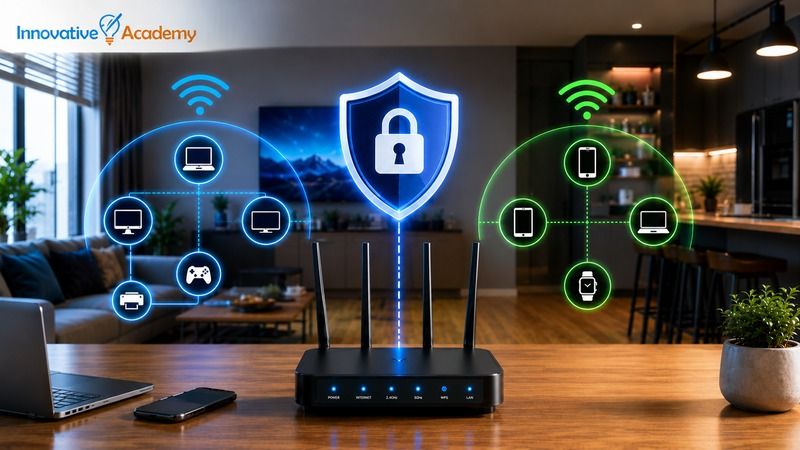
Network segmentation is simply the practice of splitting one network into multiple, isolated sections so that devices in one section can't automatically talk to devices in another unless you explicitly allow it.
Instead of one flat network where everything trusts everything else, you have separate zones:
- Trusted personal devices
- IoT and smart-home devices
- Guest devices
- Network management devices
Each zone can have its own security rules and boundaries.
The security benefit is straightforward: if a device in one segment gets compromised, the damage is contained to that segment.
A hacked smart camera on an isolated IoT network can't quietly reach your laptop because there is no unrestricted path between them.
5. Guest Wi-Fi Is Segmentation's Simplest Form
This is why a guest Wi-Fi network matters even when you have no actual guests.
Most consumer routers that offer a "guest network" feature are, under the hood, creating a segmented network—one that gets internet access but is walled off from your main network's devices.
If you put your smart TV, cheap security camera, or voice assistant on that guest network instead of your main one, you're applying the exact same principle that protects a visitor's phone.
Even if that device is compromised, it has no direct path to your laptop, your files, or your other trusted devices—assuming the router's guest isolation is correctly implemented.
In other words, "guest Wi-Fi" is really one of the simplest forms of network segmentation.
The DOJ's 2026 botnet takedown is a clear demonstration of why that boundary matters, given that the devices doing the damage were precisely the category of gadgets most homes plug in and never think about again.
6. Going Further: VLANs for the Whole Home
A single guest network is a good start, but more capable routers, firewalls, managed switches, and access points let you go further using VLANs (Virtual Local Area Networks).
A VLAN allows you to create multiple logically separated network segments using the same physical networking infrastructure.
A common home setup can split the network into four segments:
- Management Network: Router, access points, switches, and other infrastructure.
- Trusted Network: Personal computers, smartphones, tablets, and other trusted devices.
- IoT Network: Smart TVs, cameras, smart plugs, speakers, thermostats, and other connected devices.
- Guest Network: Devices belonging to visitors.
Each segment can have its own address range and firewall rules controlling exactly what traffic can cross between networks.
Under this model, a compromised smart bulb on the IoT segment can communicate only with other IoT devices and whatever specific services you've explicitly allowed—nothing else.
This is a containment strategy that doesn't depend on trusting every individual device's security, which matters enormously given how inconsistent security can be across the average smart-home device lineup.
Understanding these concepts is also an important part of professional networking. If you're interested in building these skills from the ground up, explore Hardware and Networking Training in Bangalore before moving into advanced networking technologies.
7. A Practical Home Network Layout
You don't need enterprise-grade equipment to apply this approach.
A workable home version looks like this:
- Keep your phones, laptops, and devices holding sensitive data on your main trusted network.
- Move smart-home devices such as TVs, cameras, plugs, speakers, and thermostats onto a separate IoT or guest network.
- Keep an actual guest network isolated from both your trusted and IoT networks.
- Use firewall rules to control which segments can communicate with one another.
- Keep router, access point, and firewall firmware updated.
- Change default administrator credentials.
- Disable remote management unless you specifically need it.
The exact configuration depends on your router and networking equipment, but the underlying principle is always the same: don't give every device access to every other device.
For anyone interested in learning how networks are designed and secured professionally, CCNA Training in Bangalore covers many of the foundational concepts behind segmentation, VLANs, subnetting, routing, and network security.
8. What to Do This Week
If this topic is the first time you've thought about your home network this way, the fastest wins are also the cheapest.
Start with these steps:
- Change your router's default admin password.
- Check that your router firmware is current.
- Turn off remote management unless you specifically need it.
- Enable guest or IoT network isolation.
- Move smart-home devices away from your primary network.
- Review connected devices and remove anything you no longer use.
- Use strong, unique Wi-Fi credentials.
None of this requires new hardware for most households. In many cases, you're simply using a security feature that's already sitting inside your router's settings, unused.
9. Want to Actually Understand Networking? — Innovative Academy
Everything in this article—subnets, VLANs, firewall rules, routing, and isolating traffic between network segments—is core networking curriculum, not just a home-security trick.
If this article made you curious rather than just cautious, that's exactly what structured networking training can help you understand.
CCNA Training
Innovative Academy's CCNA Training in Bangalore covers VLANs, subnetting, routing, network security fundamentals, and practical networking concepts through hands-on learning.
Hardware & Networking
For beginners, Hardware and Networking Training helps build the foundation behind networking—from computer hardware and network fundamentals to troubleshooting and connectivity.
Linux Administration
Linux Administration Training in Bangalore helps learners understand Linux systems, administration, networking, and server environments. These skills can complement networking and cybersecurity knowledge.
These are the same skills that show up professionally in network administration, cybersecurity, cloud infrastructure, and IT operations roles. The home-network example in this article is essentially a small-scale look at the concepts used in professional environments.
10. Final Thoughts
The DOJ's takedown of a 3-million-device botnet—built largely from routers, DVRs, and smart TVs sitting quietly in people's homes—is a useful reminder that the weakest link in a home network is rarely the laptop everyone worries about.
It's often the forgotten smart device with a default password, outdated firmware, or unnecessary remote access—and unrestricted access to everything else on the network.
A guest Wi-Fi network, used properly, is the simplest version of the fix. It isn't just a courtesy for visitors; it's a security boundary that can keep your smart TV's worst day from becoming your laptop's problem too.
As more homes add cameras, smart TVs, voice assistants, appliances, and other connected devices, network segmentation is becoming an increasingly practical security habit.
And if you want to understand what is happening underneath that simple guest Wi-Fi button, learning networking fundamentals, VLANs, routing, subnetting, and firewall concepts is the next step.
Explore networking and IT training programs at Innovative Academy and build practical skills for today's networking, cloud, and IT infrastructure careers.
