

Desktop GPU Power Through One Cable: What eGPU Setups Teach You About PCIe Bandwidth and Latency
Table of Contents
- 1. The Setup: A Full GPU Through One Cable
- 2. The Numbers That Make This Interesting
- 3. How a Cable Can Carry a Graphics Card's Worth of Data
- 4. The Catch: Thunderbolt Isn't the Same as Native PCIe
- 5. Why Bandwidth Caps Matter More for Some Workloads Than Others
- 6. The Broader Lesson: Bandwidth, Latency, and "Good Enough"
- 7. Why This Matters Beyond Gaming
- 8. Should You Actually Build One of These?
- 9. Understand the Fundamentals — With Innovative Academy
- 10. Final Thoughts
A mini PC, small enough to fit in one hand, runs a full desktop-class graphics card and connects with nothing more than a single cable—and the performance gain wasn't small. In a recent hands-on test, plugging a Khadas Mind Graphics external GPU enclosure housing an NVIDIA RTX 4060 Ti into a Minisforum X1 AI Pro mini PC took its 3DMark Steel Nomad Light score from 3,081 to 13,127 — more than a 4x jump — through one Thunderbolt cable.
That result is a genuinely useful, concrete way to understand a concept that trips up many people getting into hardware and networking: why the type of connection between two components can matter as much as the components themselves.
1. The Setup: A Full GPU Through One Cable
The hardware involved two very different classes of device: a compact mini PC (the Minisforum X1 AI Pro) that would normally have no room for a desktop graphics card, and an external GPU enclosure (the Khadas Mind Graphics) housing a genuine desktop-class NVIDIA RTX 4060 Ti.
The two were connected by a single Thunderbolt cable — no internal installation, no case modification, just a cable and drivers.
2. The Numbers That Make This Interesting
The performance difference wasn't subtle. In the 3DMark Steel Nomad Light benchmark, the score jumped from 3,081 (the mini PC's integrated graphics) to 13,127 with the external GPU attached—a more than fourfold increase.
In real gameplay terms, Elden Ring went from barely playable 20-22 FPS to a smooth 50-60 FPS at maximum settings.
That's not a marginal upgrade; it's the difference between a device being unusable and genuinely capable for gaming, achieved entirely through an external connection rather than any change to the PC itself.
3. How a Cable Can Carry a Graphics Card's Worth of Data
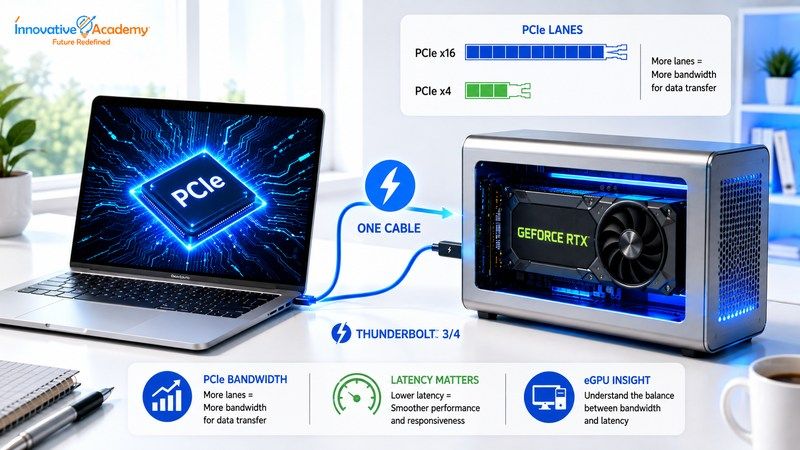
This feat works because Thunderbolt (and the closely related USB4 standard) is designed to carry PCIe data — the same protocol a graphics card normally uses when installed directly on a motherboard — over an external cable, alongside video, data, and power.
Most modern mini PCs already include a USB4 or Thunderbolt port built for exactly this purpose, which is what makes external GPU setups increasingly plug-and-play rather than a hobbyist-only workaround.
Understanding how hardware communicates through interfaces like PCIe is an important part of building a strong foundation in Hardware and Networking.
4. The Catch: Thunderbolt Isn't the Same as Native PCIe
Here's where the concept gets genuinely instructive: Thunderbolt 4 caps out at 32 Gbps of bandwidth, which sounds like a lot until you compare it to what a graphics card gets when installed directly into a motherboard's PCIe slot—a connection with dramatically more raw bandwidth and no external cable or controller in the way.
On top of the lower bandwidth ceiling, routing data through Thunderbolt's controllers adds latency that a native, internal PCIe connection simply doesn't have.
In other words, the graphics card in this setup wasn't able to perform at its best. It was running at whatever a 32 Gbps external connection, with some added latency, could deliver—and the benchmark numbers above are what "constrained but still dramatically better than nothing" looks like in practice.
5. Why Bandwidth Caps Matter More for Some Workloads Than Others
Not every workload is affected by this constraint equally. Gaming, which is often sensitive to latency and needs to move large amounts of data every frame, feels the bandwidth ceiling more directly.
AI inference workloads, by contrast, are often less sensitive to that specific kind of latency, which is part of why external GPU setups have become popular not just for gaming but for running local AI models on otherwise compact, low-power machines.
That difference arises from how each workload uses the connection.
A game needs to move data—textures, geometry, frame buffers—back and forth constantly, many times per second, and a delay in that back-and-forth shows up immediately as stutter or input lag a player can feel.
An AI inference workload, by contrast, often loads a large model into the GPU's memory once and then runs many calculations against it before needing to move much new data across the link again.
That pattern — infrequent, larger transfers rather than constant, latency-sensitive round trips — tolerates a lower-bandwidth, higher-latency connection far more gracefully.
It's the same underlying tradeoff (bandwidth versus latency) producing two very different real-world outcomes, depending entirely on how the workload is shaped.
6. The Broader Lesson: Bandwidth, Latency, and "Good Enough"
This principle is a genuinely useful mental model for evaluating any hardware or network connection, not just eGPUs: two numbers matter—how much data a connection can move (bandwidth) and how quickly a single piece of data can get from one end to the other (latency)—and different workloads care about those two numbers in different proportions.
A connection can have plenty of bandwidth and still feel sluggish if latency is high, and vice versa.
Understanding which of the two matters more for a given task is what separates "this should theoretically work" from "this actually feels good to use."
These concepts become especially important when learning CCNA networking fundamentals, where bandwidth, latency, packet transmission, routing, and network performance are practical troubleshooting considerations.
7. Why This Matters Beyond Gaming
The exact same bandwidth-versus-latency tradeoff shows up constantly in networking and infrastructure — comparing a wired connection to WiFi, evaluating cloud storage versus local storage, or deciding whether a database call over a network is going to be fast enough for a given application.
The eGPU example is just an unusually clean, benchmarkable version of a tradeoff that shows up everywhere in IT, which is precisely why it's such an eGPU-ful teaching example even for people who will never build an eGPU rig themselves.
If you're interested in moving from networking fundamentals into cloud infrastructure, you can explore AWS training in Bangalore to understand how these same infrastructure concepts apply to cloud environments.
8. Should You Actually Build One of These?
The honest answer, and one the original coverage is candid about, is that the eGPU remains a niche solution.
You're paying for a mini PC, a GPU enclosure, and a discrete graphics card separately—and depending on the components chosen, that total cost can approach or exceed a traditional desktop tower that wouldn't have the same bandwidth constraints in the first place.
Where it genuinely makes sense is flexibility: someone who wants a small, portable, low-power everyday machine but occasionally needs serious graphics or AI compute without owning two separate computers.
9. Understand the Fundamentals — With Innovative Academy
Bandwidth, latency, and how data actually moves between components and across networks are foundational concepts that show up constantly in hardware, networking, and infrastructure roles — not just in eGPU setups.
These are precisely what a hands-on hardware and networking course in Bangalore teaches:
- Hardware and Networking: Covers exactly these fundamentals: how connections, interfaces, and data transfer actually work at a practical level. Learn more through Hardware and Networking Training in Bangalore.
- CCNA Training: Extends the same bandwidth/latency thinking to network design and troubleshooting at a professional level. Explore the CCNA Course in Bangalore.
- Cloud & Networking: These principles also become important when working with cloud infrastructure, virtual machines, servers, and distributed applications. Explore the AWS Course in Bangalore.
Whether it's a Thunderbolt cable feeding a GPU or a network link feeding a data center, the underlying question — how much data can move, and how fast can a single request get through — is the same one these programs are built to teach you to reason about.
10. Final Thoughts
A single cable turning a pocket-sized PC into a capable gaming and AI machine is a fun demo, but the real value in this story is what it makes visible: bandwidth and latency aren't abstract specs on a datasheet; they're the difference between 20 FPS and 60 FPS, between a connection that "should work" and one that actually feels satisfying to use.
That's a lesson worth understanding whether you're building an eGPU rig, designing a home network, or architecting cloud infrastructure—the useful tradeoff is the same, just at a different scale.
It's also a good reminder that specs on a box rarely tell the whole story on their own. "32Gbps Thunderbolt 4" and "PCIe x16 slot" both sound like impressive numbers in isolation, but what actually determines whether a setup feels fast is how those numbers interact with the specific workload running on top of them — how much data it moves, how often, and how sensitive it is to delay.
Anyone getting into hardware, networking, or infrastructure eventually has to develop that instinct: reading past the headline number on a spec sheet to ask what the connection is actually going to be asked to do and whether its particular strengths and weaknesses match that job.
That instinct is what turns a benchmark chart into something you can actually reason about, rather than just compare it.
Ready to build your IT fundamentals? Explore Innovative Academy for practical training in networking, cloud, Linux, DevOps, and other in-demand IT skills.
